Conversationality
We explore how to build proactive voice agents that work independently of user input. By flipping the traditional voice pipeline, we create agents that can speak first, handle interruptions, and maintain natural conversation flow. This presents our approach to eliminating brittle silence heuristics and enabling truly autonomous voice interaction.
Key Takeaways
- The agent loop runs continuously, not just on user speech.
- Two simple tools pace conversation:
speak()andwait(). - A blocking barge-in handler pauses the agent while you talk.
- Streaming keeps it responsive: stream STT in, start TTS early on
speakactions, cancel on barge-in. - Removes brittle silence heuristics; decisions are made from context.
1.Introduction
Voice AI has become a standard way to build conversational interfaces. The typical architecture is straightforward: user speaks → speech-to-text → LLM processes → text-to-speech → system responds. This works well when users are actively engaged and responsive.
However, this reactive design creates a critical failure mode: if the user doesn't speak, nothing happens. In any real-world application, users will inevitably:
- Take time to think before responding
- Get distracted or multitask
- Intentionally test the system's boundaries
- Fall silent during difficult tasks
We encountered this problem when deploying our AI tutoring system to families. Students quickly discovered they could stop lessons entirely by simply not speaking. This paper describes how we solved it by making voice agents inherently proactive—capable of taking initiative, handling barge-ins, and maintaining engagement even when users are silent.
2.Traditional Voice Agent
The traditional voice agent is a relatively linear pipeline, shown below:
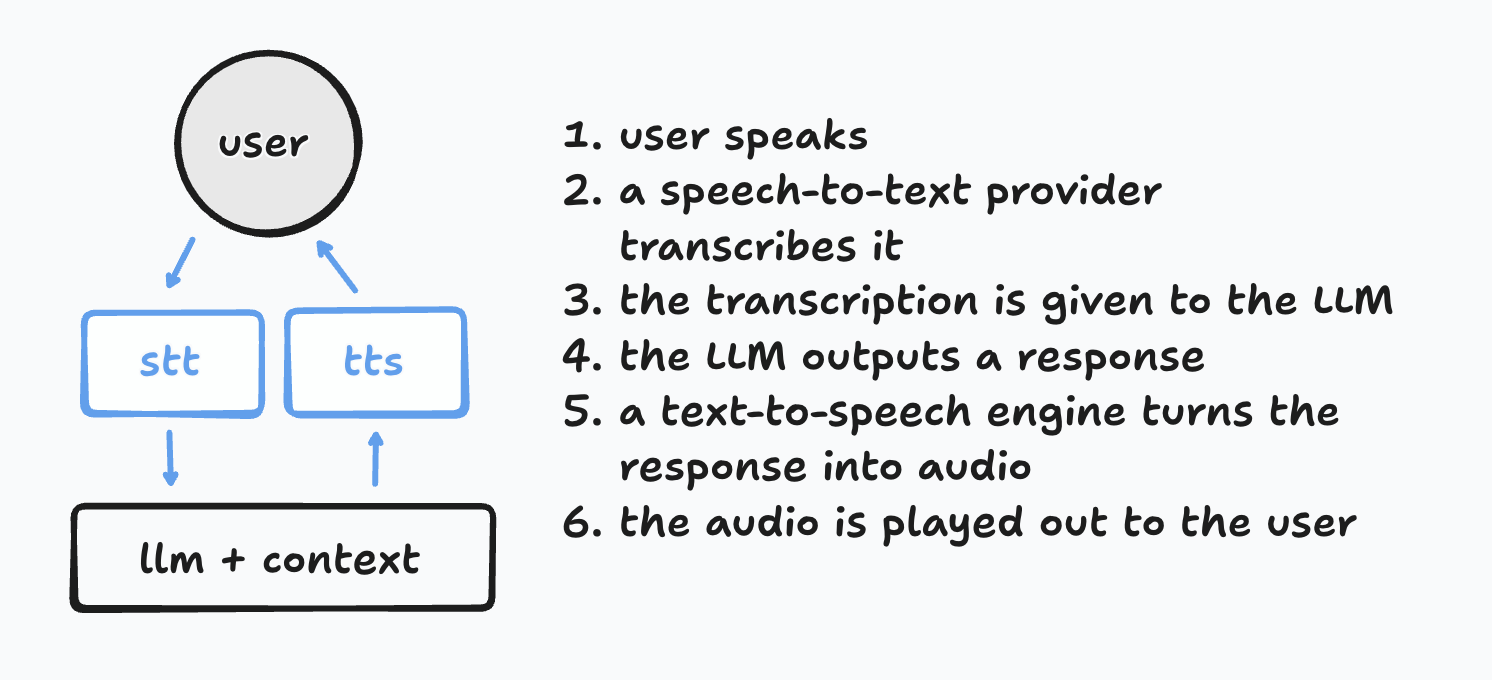
Through this simple pipeline of speech-to-text (STT), LLM calls, and text-to-speech (TTS), you can get a simple, fast, and effective voice agent running.
Many optimizations can be made around chunk streaming, context engineering, and tool calls. Platforms like Vapi, Livekit, and Pipecat make this trivial.
This guide is a very good introduction for the current state of the art for voice AI.
3.Classic Pipeline + Silence Words
If a user stops speaking, we can usually detect the silence. At minimum, we can keep a timer for when the last STT trigger happened. Using this timer, we can trigger audio playback of example words to re-engage the user, like "Are you there?" or "Hello?"
This works well, but doesn't allow for contextual silence timeouts. If a student is working on a hard problem, we might want to wait for a minute. But if they aren't responding to a simple conversational question, we might want to wait 10 seconds.
last_stt_time = now()

def on_user_speech(user, audio_chunks):
    new_words = speech_to_text(audio_chunks)
    last_stt_time = now()
    response = llm.call(context + new_words)
    audio_chunks_out = text_to_speech(response)
    user.play_audio(audio_chunks_out)

while True:
    if now() - last_stt_time > 30:  # seconds
user.play_audio("Hello?")4.Classic Pipeline + Silence Triggers
The only way to make contextual decisions about silence is to use the conversation itself. So, we can have an LLM decide what to do:
last_stt_time = now()

def on_user_speech(user, audio_chunks):
    ...

while True:
    if now() - last_stt_time > 30:  # seconds
        llm_decide_what_to_do()
Maybe the LLM will decide to play one of the re-engagement audio prompts like "Hey, are you still there?", and maybe the agent will do nothing. It depends on context.
This works better, but key questions remain: how long to wait, what choices to offer, and when to do nothing. Shorter timeouts call the model more often, increasing errors and cost.
5.Flipped Pipeline
In the above example, we've subtly separated the event loop of the agent from the user input. Even without user input, the agent is going to run! Let's take this to the extreme and see what happens:
context = new Context()
tools = [speak, ...]

def speak(words):
    audio_chunks_out = text_to_speech(words)
    user.play_audio(audio_chunks_out)

def on_user_speech(user, audio_chunks):
    new_words = speech_to_text(audio_chunks)
    context.add(new_words)

while True:
    resp = llm.call(context, tools)
    context.add(resp)
Now we've fully separated the agent from the user. The agent runs even if no one is on the call. This has clear advantages:
- The agent now decides what to do at every moment, which is closer to how humans work.
- The turn-taking "you speak, I speak" method of the classical pipeline is completely gone. Now the agent can speak first, speak twice, or even wait for you to complete a task.
However, this is incomplete. Calling the model every loop is expensive—especially when most loops should do nothing.
6.Flipped Pipeline + Wait
To fix this, let's give the agent the ability to wait.
context = new Context()
tools = [speak, wait, ...]

def speak(words):
    audio_chunks_out = text_to_speech(words)
    user.play_audio(audio_chunks_out)

def wait(seconds):
    sleep(seconds)

def on_user_speech(user, audio_chunks):
    new_words = speech_to_text(audio_chunks)
    context.add(new_words)

while True:
    resp = llm.call(context, tools)
    context.add(resp)
Now the agent can wait. With simple prompting, it will speak, wait, check in with the user, and even handle tasks while the user speaks.
Once again, there are drawbacks. Notably:
- handling user barge-in
- waiting for users to finish speaking
- ensuring that context is always fresh
These become challenges.
7.Flipped Pipeline + Wait + Barge-in
The cleanest solution to the problems above is to add a blocking barge-in handler—so the entire execution of the agent stalls while the user speaks.
This ensures that the agent always waits for the user to be finished before making its next decision—and prevents the agent from speaking over the user. The pseudocode for this gets quite complicated, so we'll let you figure it out for yourself :)
You can use any number of voice activity detection (VAD) systems like Silero, Pipecat's Smart-Turn, or Deepgram's Flux (our choice) to determine when the user has started and stopped speaking.
Once implemented, the voice agent will run independently of the user in a clean manner. When the user speaks, the agent will pause and wait for them to finish—then continue its loop.
8.Limitations and Tradeoffs
- Compute budgets: An independent loop introduces ongoing compute. Mitigate with a
wait()tool, adaptive sleep, max-steps per loop, and per-user budgets. - Barge-in timing: VAD thresholds and smoothing can cause clipping or false starts. Calibrate, and treat VAD + STT as a single source (e.g., Flux) to simplify timing.
- Streaming tool calls: The model may emit multiple/partial tool calls. Use an incremental parser, validate fragments, buffer safely, and start TTS early only on validated
speak()calls. - Context freshness and concurrency: Avoid double-acting with an event ledger and idempotency keys; prefer atomic writes and single-flight per user.
- Observability: Trace each loop—decision, chosen tool, durations, budget usage, and next wake—to make behavior debuggable in production.
- Fallback behavior: When budgets are exceeded or tools fail, degrade gracefully to the reactive pipeline rather than dropping the session.
9.Streaming
Without optimization, running a proactive voice agent like this can be slow. Our first versions would take 5–10s to respond to the user.
Latency was worst when the agent was mid-task (for example, using other tools) before speaking its response. Streaming fixes this.
Speech to text. Streaming STT is the same as in the classic pipeline. We prefer Deepgram's Flux for latency since it combines VAD and STT on one socket.
LLM responses. Streaming LLM output is trickier. In the classic pipeline, any response is spoken—therefore you can pass streamed chunks directly to TTS. Here, you need to parse tool calls as they stream. If you can spot a speak action early, start TTS right away. Handle the case where the model returns multiple tool calls in one response.
Text to speech. Once you identify a speak action, send chunks into your TTS engine as usual. Cancel output when the user interrupts.
While proactive voice agents add complications to streaming, it is very doable.